Extra Utilities
Campaign Information
Sometimes it's useful (or necessary) to know your Campaign ID or the IDs of the tiers associated with your campaign. Patreon doesn't expose this information in an easy location, so an editor utility is provided to make it more accessible.
You can launch the utility from Tools > Get Campaign Info
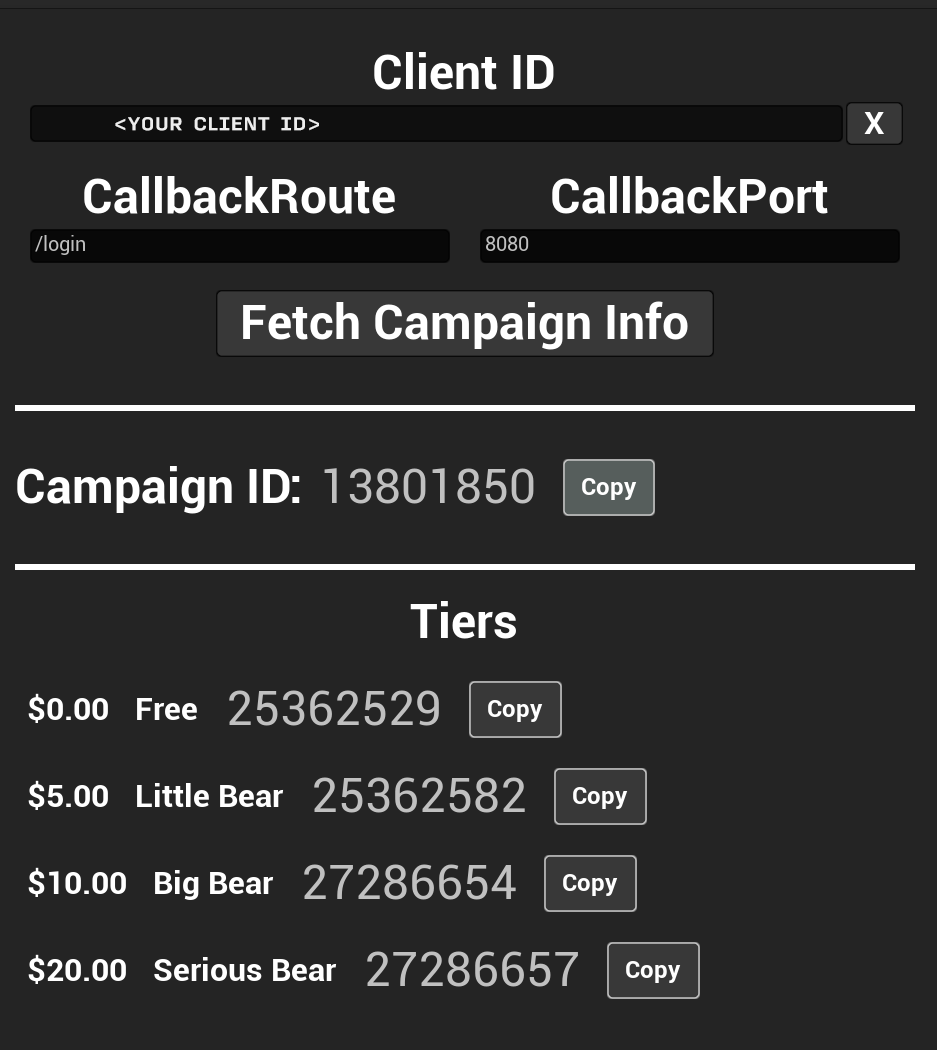
Paste your Client ID into the field at the top of the form, set the CallbackRoute and CallbackPort to match the values you use for authentication, and then click the Fetch Campaign Info button. You will be asked to sign into Patreon, and you must use the account which owns the campaign (if you use another account you will see an error in the console log).
This will download some information about your campaign and display it with buttons to easily copy the IDs to your clipboard:
What can I use this for?
The most common use is to be able to pass your Campaign ID to Get User Info or Get Pledge History. If you ever perform a request against the API which returns information about multiple campaigns, providing your own Campaign ID to these functions will ensure that you only get data related to your campaign in their outputs, which greatly simplifies the number of details you need to handle.
Additionally, it is possible to query for Tiers both by name and by ID. Querying by ID has the advantage that if you ever change the name of a tier you do not need to update your application--the ID will remain the same.
For any questions, help, suggestions or feature requests, please feel free to contact me at nbpsup@gmail.com